To make sound louder in Windows 10, first turn the volume to 100 using the speaker icon on the taskbar, and turn up the volume in the app or website you’re using. For an extra boost, turn on Loudness Equalization. Right-click the speaker icon, select Sounds, open the Playback tab, double-click your speakers, and check Loudness Equalization on the Enhancements tab.
Loudness Equalization evens out quiet and loud parts so quiet sound is easier to hear.
Applies to: Windows 10 laptops and desktops, with speakers or headphones. Checked against Microsoft Support on September 25, 2026.
Turn up every volume control
Sound passes through several volume levels. If any one is low, everything is quiet.
- Select the speaker icon on the taskbar and drag the slider to 100.
- Right-click the speaker icon and select Open Volume mixer. Turn up the app you’re listening to.
- Turn up the volume in the app itself, such as the video player or the browser tab.
- Turn up your speakers or headphones if they have their own volume control.
Turn on Loudness Equalization
- Right-click the speaker icon on the taskbar and select Sounds.
- Select the Playback tab, then double-click your speakers or headphones.
- Open the Enhancements tab and check Loudness Equalization.
- Select OK.
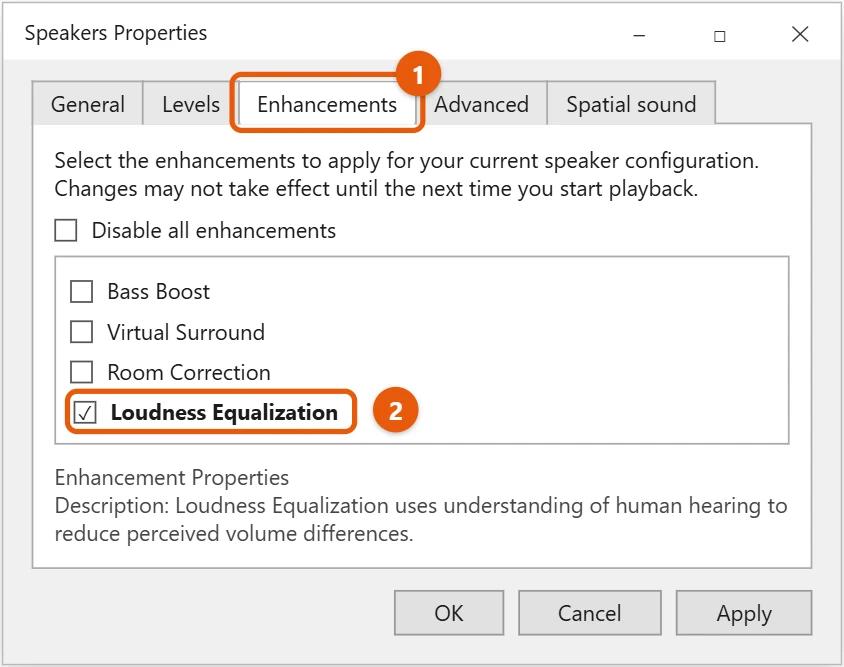
If there’s no Enhancements tab, your audio driver doesn’t offer it. Some PCs have their own audio app from the maker with a similar option.
Check the output device and level
- In Sounds > Playback, double-click your speakers.
- Open the Levels tab and make sure the level is at 100 and not muted.
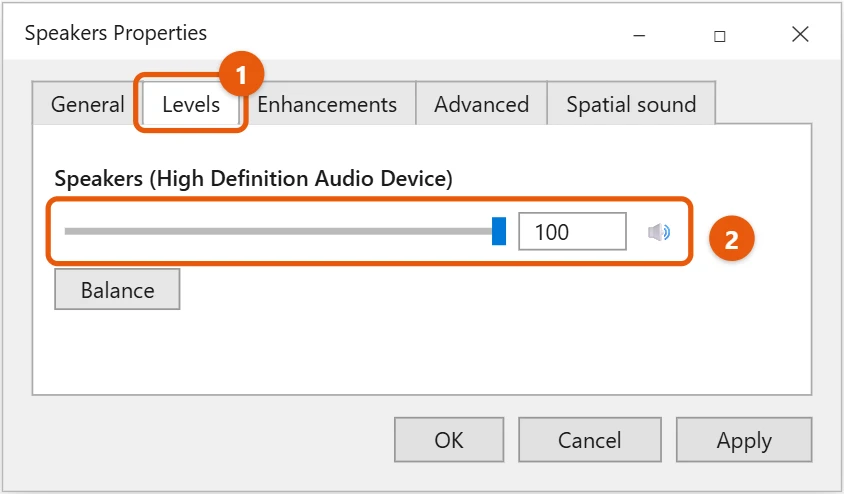
Also check that sound is going to the right device. See how to set the default audio device in Windows 10.
Make headphones louder
- Plug them into the headphone jack or USB port directly, not through a hub or a monitor.
- For Bluetooth headphones, turn up the volume on the headphones as well as in Windows.
- Turn on Loudness Equalization for the headphones in the Playback list.
Update the audio driver
An old or generic driver can limit the volume. Right-click Start, open Device Manager, expand Sound, video and game controllers, right-click your audio device, and select Update driver. See how to update all drivers on Windows 10.
Stop Windows from lowering the volume
Windows can turn other sounds down by 80 percent whenever it thinks you’re on a call, and sometimes it guesses wrong. Right-click the speaker icon, select Sounds, open the Communications tab, choose Do nothing, and select OK.
Make quiet videos louder
- VLC media player can go above 100 percent. Drag the volume slider in the bottom-right corner up to 125 percent, or use the mouse wheel over it.
- In the browser, check the volume control inside the video player itself as well as the Windows volume. Many sites keep their own level.
- Video calls in Teams or Zoom have their own speaker volume in the app’s audio settings.
Some videos are simply recorded quietly. Loudness Equalization, covered above, helps most with these.
Be careful with volume booster apps
Apps that promise sound “beyond 100%” can distort the sound and damage small laptop speakers. Try the steps above first, and add external speakers if you still need more.
Frequently asked questions
Why is my laptop so quiet even at 100?
Small laptop speakers have limits. Check the app volume and Loudness Equalization, or use external speakers or headphones.
Why did my sound get quieter after an update?
An update may have reset the enhancements or the driver. Check Loudness Equalization and the Levels tab again.
What if there’s no sound at all?
See how to fix no sound in Windows 10.
To make your microphone louder instead, see how to turn up mic volume in Windows 10.
For fuller sound, see how to connect external speakers to a Windows 10 laptop.
If captions are covering your videos, see how to turn off captions in Windows 10.
On Windows 11, see how to open the volume mixer in Windows 11.
On Windows 11, see how to increase the volume on a laptop in Windows 11.
On Windows 11, see how to adjust bass with Bass Boost.
Microsoft’s guide is Fix sound or audio problems in Windows. More help is on our Windows Help & Guides page.
Can I make Bluetooth headphones louder?
Turn up the volume on the headphones themselves as well as in Windows, since they often have separate controls. Also check the headphone maker’s app for a volume limit or hearing-protection setting.

Matt Jacobs has been working as an IT consultant for small businesses since receiving his Master’s degree in 2003. While he still does some consulting work, his primary focus now is on creating technology support content for SupportYourTech.com.
His work can be found on many websites and focuses on topics such as Microsoft Office, Apple devices, Android devices, Photoshop, and more.