Select Start > Power, then hold Shift while you select Shut down. That turns the PC off completely. A normal Shut down is faster but saves part of Windows to start up quicker next time.
Applies to: Windows 11.
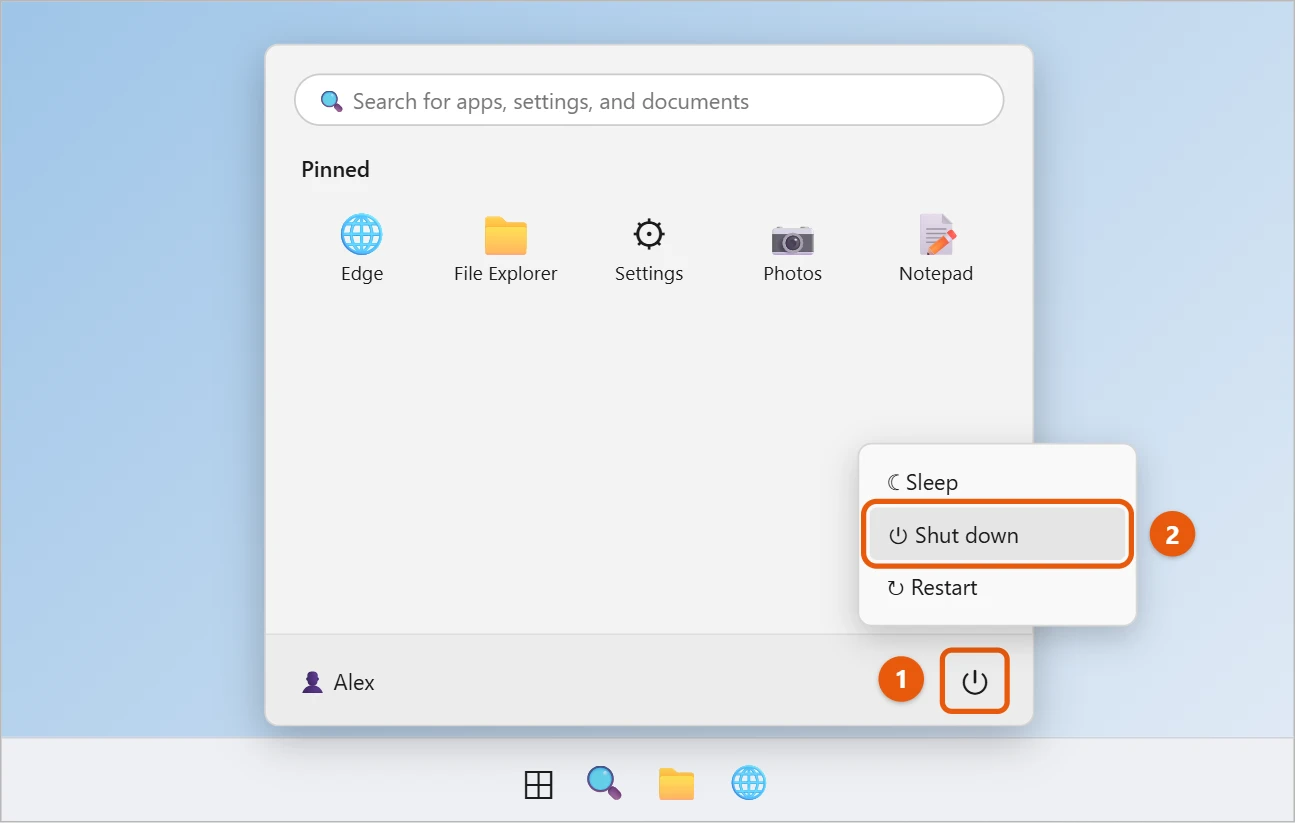
Shut down the normal way
- Select Start.
- Select Power in the bottom-right corner of the Start menu.
- Select Shut down.
Do a full shutdown
Windows uses fast startup on many PCs. It saves part of Windows when you shut down, so the PC starts faster. To turn the PC off completely instead:
- Hold Shift while you select Power > Shut down, or
- Select Restart. A restart always starts Windows fresh.
A full shutdown can help after updates or when a device isn’t working right.
Other ways to shut down
- Keyboard: press Alt + F4 on the desktop, choose Shut down, and select OK.
- Start button menu: right-click Start and select Shut down or sign out > Shut down.
- Power button: press the PC’s power button once. What it does depends on your power settings.

Sleep, shut down or restart?
- Sleep keeps your work open and wakes up in seconds. Use it for short breaks. If the PC dozes off when you don’t want it to, you can stop the computer from sleeping in Windows 11.
- Shut down turns the PC off to save power.
- Restart fixes many problems and finishes updates.
Turn off fast startup for good
If you’d rather every shutdown be a full one, turn fast startup off. Your PC will take a few extra seconds to start.
- Search Start for Control Panel and open it.
- Select Hardware and Sound > Power Options > Choose what the power buttons do.
- Select Change settings that are currently unavailable.
- Clear Turn on fast startup (recommended) and select Save changes.
You can also do a one-off full shutdown from Command Prompt with shutdown /s /t 0.
Schedule a shutdown or make a shutdown shortcut
- Shut down later: press Windows + R, type
shutdown /s /t 3600, and press Enter. The number is in seconds, so 3600 turns the PC off in an hour. Typeshutdown /ato cancel. - Shortcut: right-click the desktop, select New > Shortcut, enter
shutdown /s /t 0, and name it Shut down. Double-click it to turn the PC off straight away. Both are full shutdowns, because the shutdown command only uses fast startup when you add/hybrid.
How to tell if fast startup is on
Open Task Manager with Ctrl + Shift + Esc, select Performance, and look at Up time under CPU. If it shows days even though you shut down every night, fast startup is keeping part of Windows running between sessions. After a restart or full shutdown, it resets to a few minutes.
If the PC won’t shut down properly
- An app is preventing shutdown. Windows lists it. Select Cancel, save your work in that app, and close it, or select Shut down anyway.
- It’s stuck on “Shutting down” or “Working on updates.” Leave it for up to an hour while updates install. Don’t hold the power button unless nothing has changed for a long time.
- It restarts instead of turning off. Turn off fast startup as above, and update the PC’s BIOS and chipset drivers from its maker.
- It turns itself back on. Run
powercfg -lastwakein an administrator Command Prompt to see what woke it, such as a mouse or a network adapter.
Frequently asked questions
Should I shut down every night?
It’s not required. Sleep uses very little power, but shutting down now and then keeps things running smoothly.
I’m on Windows 10. Is it the same?
Yes. The Windows 10 version is in shutting down Windows 10.
Does fast startup cause problems?
Usually not, but it can. Because Windows doesn’t fully restart, a driver problem can carry over between sessions, and some updates only finish after a restart. If you dual-boot with Linux, fast startup can also lock your Windows drive so Linux can’t write to it.
Is it bad to shut down by holding the power button?
Only use it when Windows is frozen. Holding the button cuts power without saving anything, so open files can be lost or damaged. A normal shutdown is always safer.
How long does a full shutdown take?
Usually 10 to 30 seconds. It may take longer the first time after turning off fast startup, or when updates are waiting to install.
Does a full shutdown save more power?
Very slightly. With fast startup, the PC is still fully off; it just saves a small file to the drive.
Want a one-click shut down button? You can put a power button on the taskbar in Windows 11.
Sleep and hibernate are explained alongside shutdown in Shut down, sleep, or hibernate your PC.

Matt Jacobs has been working as an IT consultant for small businesses since receiving his Master’s degree in 2003. While he still does some consulting work, his primary focus now is on creating technology support content for SupportYourTech.com.
His work can be found on many websites and focuses on topics such as Microsoft Office, Apple devices, Android devices, Photoshop, and more.