To open HEIC files in Windows 10, install HEIF Image Extensions and HEVC Video Extensions from the Microsoft Store. After that, HEIC photos open in the Photos app and show thumbnails in File Explorer. To make a copy other apps can use, open the photo in Paint and save it as a JPEG.
Applies to: Windows 10. Microsoft ended Windows 10 support on October 14, 2025, so a PC without Extended Security Updates no longer receives security fixes; that program runs until October 12, 2027.
On a newer PC, the steps for opening HEIC files in Windows 11 are a little different.
What is a HEIC file?
HEIC (High Efficiency Image Container) is the photo format iPhones and some Android phones use by default. It stores a photo at about half the size of a JPG with the same quality, and can also hold Live Photos and depth data. Windows 10 doesn’t open it out of the box, which is why the photos show as blank icons or won’t open.
Install the extensions
- Open Microsoft Store, search for HEIF Image Extensions, and select Get.
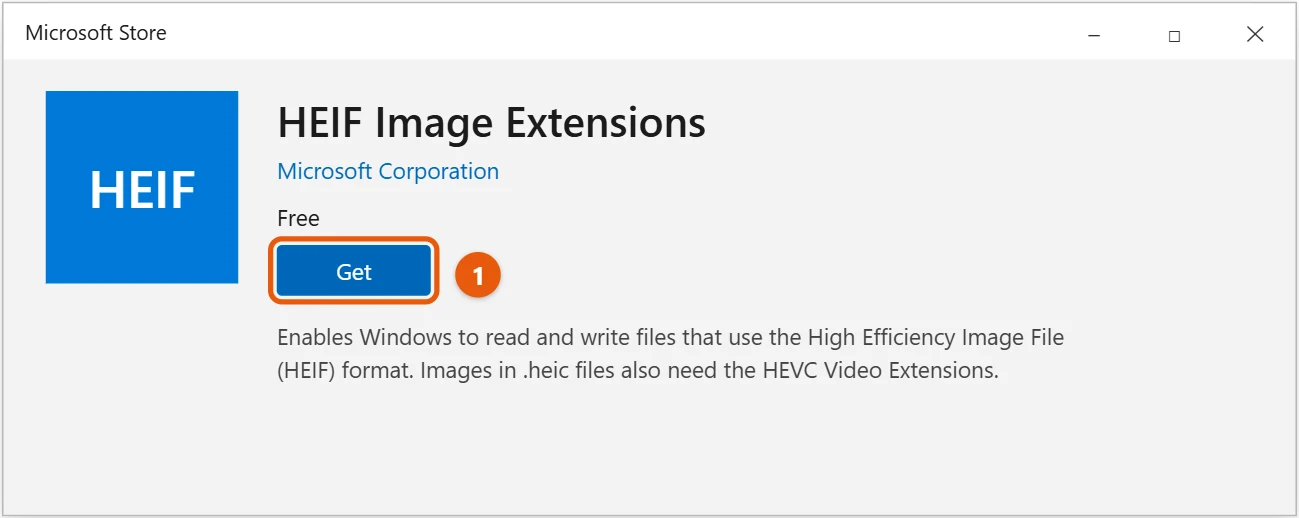
- Search for HEVC Video Extensions and install it too. The HEVC extension is sold by Microsoft in the Store, and HEIC photos won’t display without it.
- Double-click a HEIC photo. It opens in Photos.
If thumbnails still don’t show, restart the PC.
Check that both extensions are installed
- Select Start > Settings > Apps > Apps & features.
- Type HEIF in the search box. HEIF Image Extensions should appear.
- Type HEVC. HEVC Video Extensions should appear too.
If one is missing, install it from Microsoft Store and restart the PC.
iPhone videos need HEVC too
iPhones also record video in HEVC, saved as .MOV files. Once HEVC Video Extensions is installed, these videos play in the Movies & TV app. Other players work too, as shown in playing a MOV file in Windows 10.
Convert HEIC to JPG
- Right-click the HEIC photo and select Open with > Paint.
- Select File > Save as > JPEG picture.
- Choose a folder, give the file a name, and select Save.
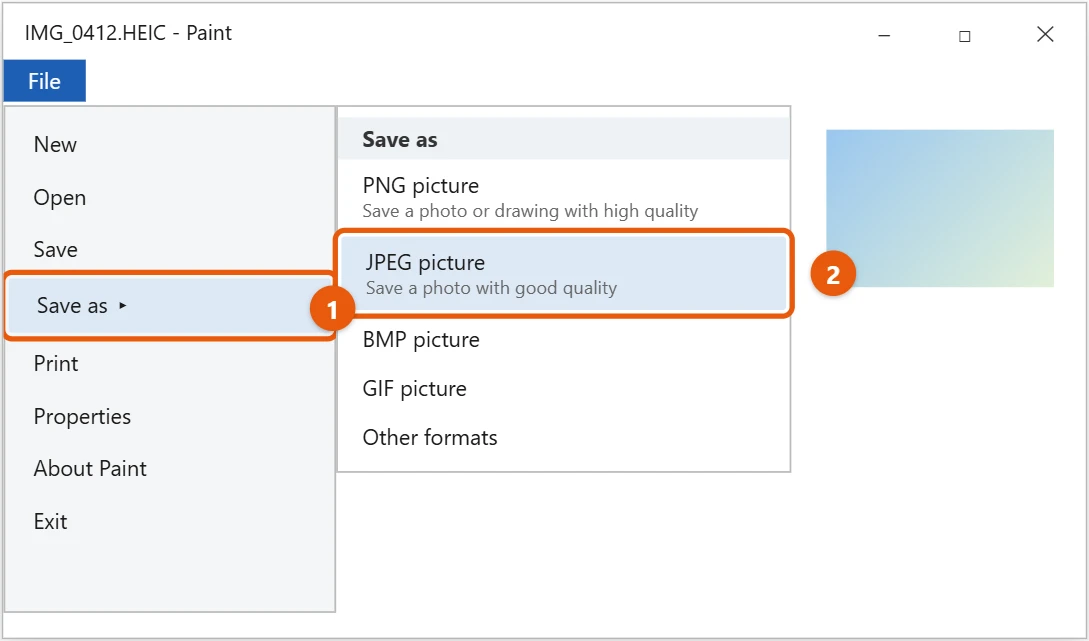
The original HEIC file stays as it is.
Paint converts one photo at a time. If you have a lot of them, change the iPhone settings below so future photos arrive as JPG. To keep the most detail, choose PNG picture instead of JPEG; the file will be larger.
Open HEIC files in other apps
Once HEIF Image Extensions is installed, most Windows apps that use the built-in image support can open HEIC files too, including Paint and File Explorer thumbnails. Recent versions of photo editors such as GIMP and Adobe Photoshop can open HEIC as well. If an older app still can’t, convert the photo to JPG first as shown above.
Get JPG photos from your iPhone instead
On the iPhone, go to Settings > Photos and, under Transfer to Mac or PC, choose Automatic. Photos copied over a cable are then converted to JPG. You can also set Settings > Camera > Formats to Most Compatible so new photos are taken as JPG.
If HEIC photos still won’t open
- The Photos app shows an error: update Photos and both extensions in Microsoft Store under Library, then restart the PC.
- No thumbnails in File Explorer: select View > Options > View and clear Always show icons, never thumbnails.
- The Store won’t let you get HEVC: sign in to Microsoft Store with your Microsoft account. The extension is a paid app, so you may need a payment method on the account.
- Another app can’t open the file: many older apps don’t read HEIC. Convert the photo to JPG first.
Frequently asked questions
Why do HEIC photos show a blank or error in Photos?
The HEVC Video Extensions are missing. Install them from the Store.
How do I copy iPhone photos to my PC?
Connect the phone with a cable and transfer photos from iPhone to PC in Windows 10. If your photos are in iCloud, install iCloud for Windows from the Microsoft Store and turn on Photos to sync them to your PC.
Can I open HEIC without buying HEVC Video Extensions?
Some PCs come with the HEVC extension already installed by the maker. If yours doesn’t, set the iPhone to send JPG photos as shown above, so you won’t need it.
Will converting to JPG lower the quality?
Slightly, because JPG compresses the image again. For everyday photos the difference is hard to see. Keep the original HEIC if you want the best copy.
Related: to make an app open HEIC files every time, set default apps in Windows 10. A converted photo can be made smaller when you resize an image in Windows 10, and other file types work the same way, such as opening EPUB files on Windows 10.
The extension is listed in the Store as HEIF Image Extensions.

Matt Jacobs writes and maintains the guides on Support Your Tech, which he started in 2017. He spent most of his career keeping small-business PCs running and still takes the occasional consulting job, so the steps here come from fixing the same problems on other people’s computers. Every guide is checked on his own Windows 11, Windows 10, Mac, iPhone and iPad before it goes up.