Press the volume up key on your HP laptop’s keyboard (it has a speaker icon, usually on the top row). You can also select the speaker icon on the taskbar and drag the volume slider to the right. If one app is still quiet, open Settings > System > Sound > Volume mixer and turn that app up.
Applies to: HP laptops and other Windows 11 laptops. Checked against Microsoft Support on September 29, 2026.
Use the volume keys
Press the key with the speaker and plus sign or larger waves. On many HP laptops, these are on the top row of the keyboard. If pressing the key does something else, hold Fn and press it.
A small volume box appears near the top of the screen so you can see the level.
Use the taskbar slider
- Select the network, speaker, or battery icon in the bottom-right corner of the taskbar. You can also press Windows logo key + A.
- Drag the volume slider all the way to the right.

Select the arrow next to the slider to check that the sound is going to the right speakers or headphones.
Turn up one app in the Volume mixer
- Select Start > Settings > System > Sound.
- Select Volume mixer.
- Turn up the main Volume slider.
- Find the app that’s too quiet and drag its slider to the right. Make sure it isn’t muted.
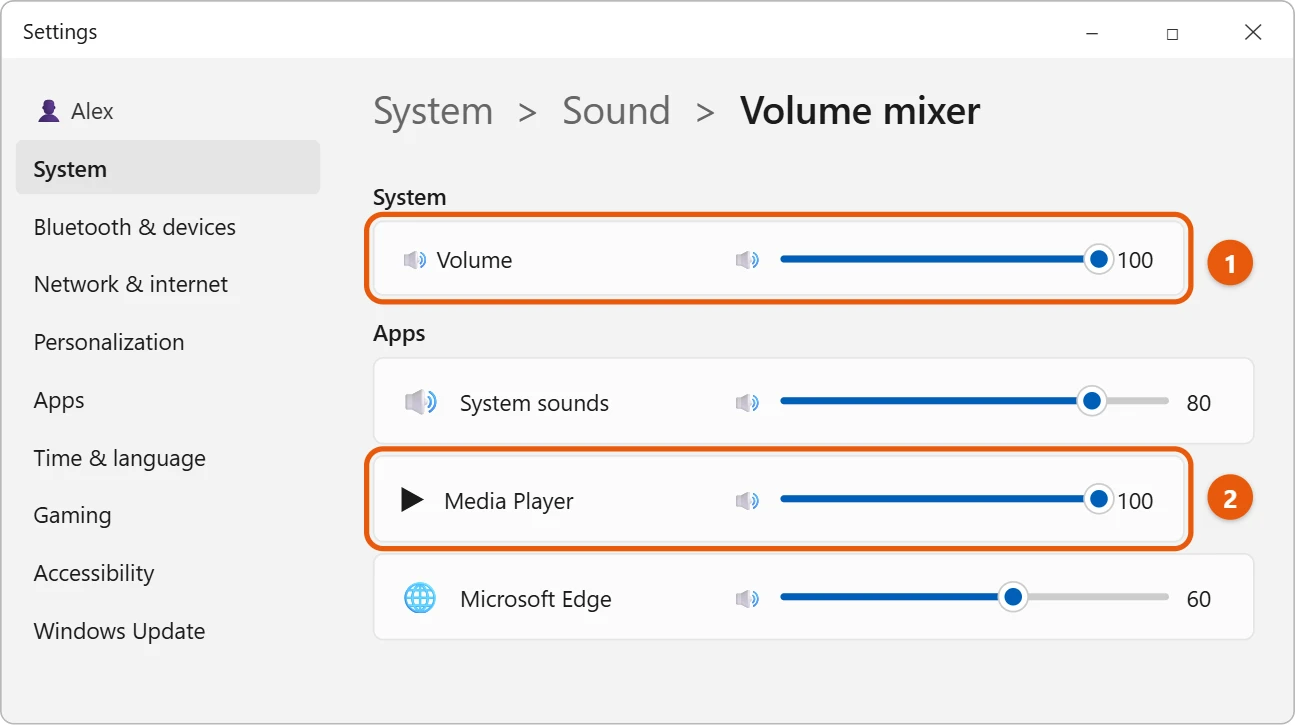
Also turn up the volume inside the app itself, such as the video player or the website you’re watching.
Still too quiet?
- Turn off audio enhancements: In Settings > System > Sound, select your speakers under Output, then Audio enhancements, and turn them off. Microsoft says enhancements can lower the volume on some PCs.
- Try a different audio format: On the same page, select Advanced and choose another Default format.
- Check the maker’s app: Many HP laptops come with an audio app from HP that has its own volume and sound settings.
- Use speakers or headphones: Laptop speakers are small. See how to turn on computer speakers in Windows 11.
Frequently asked questions
Can I turn the volume above 100?
Not with Windows itself. Turn up both the main volume and the app’s own volume, and try the steps above. We don’t recommend third-party volume booster apps.
Where else can I open the Volume mixer?
See how to open the Volume mixer in Windows 11.
If some sounds are loud and others are quiet, turn on Loudness Equalization.
Microsoft’s reference is Fix low or quiet sound in Windows. More help is on our Windows Help & Guides page.

Matt Jacobs has been working as an IT consultant for small businesses since receiving his Master’s degree in 2003. While he still does some consulting work, his primary focus now is on creating technology support content for SupportYourTech.com.
His work can be found on many websites and focuses on topics such as Microsoft Office, Apple devices, Android devices, Photoshop, and more.