To use a WD easystore drive on Windows 11, connect it to a USB port with the cable that came with it. If you have an easystore desktop drive, plug in its power adapter first. Windows sets the drive up automatically, and it appears in File Explorer under This PC with the name easystore and its own drive letter. Open it to copy files, and eject it from the taskbar before you unplug it.
Applies to: Windows 11 and WD easystore portable and desktop drives. Checked on September 30, 2026.
Portable or desktop: what’s the difference?
- easystore portable drives are small and get power from the USB cable. Plug them in and they’re ready.
- easystore desktop drives are larger, hold more, and need their own power adapter plugged into a wall outlet. They won’t start on USB power alone.
Both work the same way once connected. You don’t need to install a driver, because Windows 11 includes the USB storage drivers these drives use.
Connect and open the drive
- For a desktop drive, connect the power adapter to the drive and a wall outlet.
- Connect the USB cable to the drive and then to a USB port on your PC. Use a port on the PC itself rather than a hub.
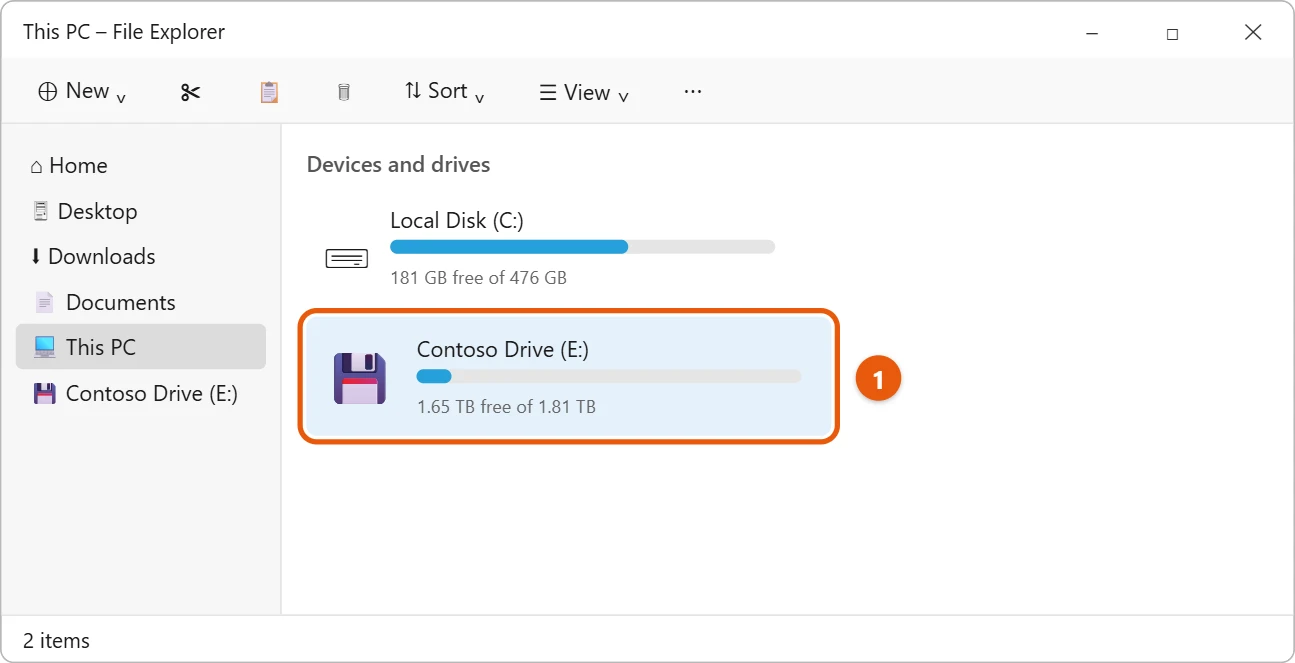
- Press Windows logo key + E to open File Explorer, and select This PC.
- Double-click easystore under Devices and drives.
Check the drive’s format and size
Before you fill the drive, it’s worth checking how it’s formatted, especially if you’ll also use it on a Mac or a game console.
- In File Explorer, right-click the drive and select Properties.
- On the General tab, look at File system and Capacity.
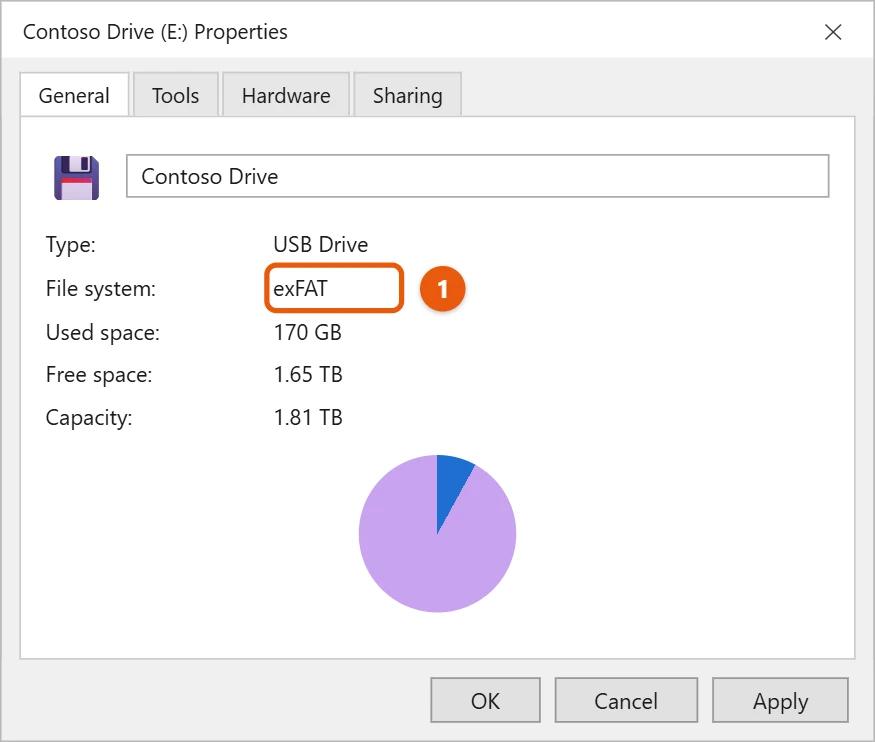
- exFAT works on Windows and Macs, so it’s the easiest choice for moving files between them.
- NTFS is the Windows standard. It’s fully supported on Windows but read-only on a Mac without extra software.
The capacity will look smaller than the size on the box. Drive makers count 1 TB as 1,000 GB, while Windows uses larger binary units, so a 2 TB drive shows about 1.81 TB. Nothing is missing.
Copy files and back up
- Copy files: select files in File Explorer, press Ctrl + C, open the easystore drive, and press Ctrl + V. Or drag files from one window to the drive’s window.
- Back up automatically: turn on File History in Control Panel and choose the easystore drive. The steps are in how to use a WD My Passport drive on Windows 11, and they’re the same for any external drive.
For other backup choices, see how to back up files in Windows 11.
WD offers optional software for the drive on its support site. You don’t need it to store files or back up with Windows.
Eject the drive safely
- Select the Show hidden icons arrow (^) on the taskbar.
- Select the USB drive icon.
- Select Eject easystore, and unplug the drive when Windows says it’s safe.
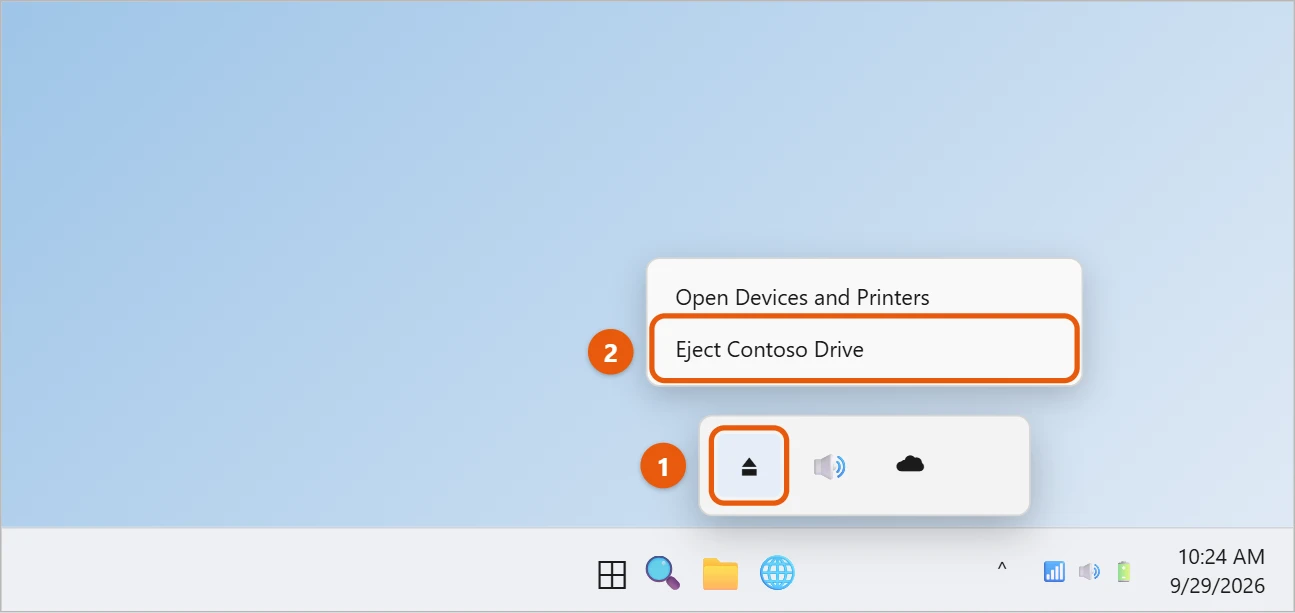
If the eject icon isn’t there or Windows says the drive is in use, see how to safely eject an external hard drive in Windows 11.
If the easystore drive doesn’t show up
- Check the power (desktop drives). Make sure the power adapter is plugged in and the drive’s light is on. A desktop easystore drive won’t appear without it.
- Try another port and cable. Unplug the drive, restart your PC, and connect it to a different USB port. Try another cable if you have one.
- Avoid hubs and extension cables while you troubleshoot.
- Test it on another computer. If it doesn’t work anywhere, contact the drive maker.
- Check Disk Management (administrator). A drive that lights up but doesn’t appear in File Explorer may show in Disk Management without a drive letter. Opening Disk Management and assigning a letter need an administrator account. On a work or school PC, ask your IT administrator.
If Windows asks for a driver, it’s usually a connection problem rather than a missing WD driver, so try the port and cable steps first.
Frequently asked questions
Do I need to format a new easystore drive?
Usually not. It comes formatted and ready to use. Formatting erases everything on the drive, so only do it if you have a specific reason, such as needing a different file system.
Can I use an easystore drive with a game console?
Many consoles can use a USB drive for games or media, but they may need to format it their own way first, which erases it. Move your PC files off the drive before you set it up on a console.
Is easystore different from My Passport?
They’re both WD drives and work the same way on Windows 11. The main differences are the name, the design and where they’re sold.

Matt Jacobs has been working as an IT consultant for small businesses since receiving his Master’s degree in 2003. While he still does some consulting work, his primary focus now is on creating technology support content for SupportYourTech.com.
His work can be found on many websites and focuses on topics such as Microsoft Office, Apple devices, Android devices, Photoshop, and more.