
How to Run CHKDSK in Windows 10
To run CHKDSK in Windows 10, open Command Prompt as administrator, type chkdsk C: /f, and press Enter. If Windows is using the drive, type… Continue Reading How to Run CHKDSK in Windows 10
To run CHKDSK in Windows 10, open Command Prompt as administrator, type chkdsk C: /f, and press Enter. If Windows is using the drive, type… Continue Reading How to Run CHKDSK in Windows 10

To run a program as administrator in Windows 10, right-click the program or its shortcut and select Run as administrator. Then select Yes in the… Continue Reading How to Run a Program as Administrator in Windows 10

OpenSSL has no official Windows installer. Install a trusted build with winget, use the copy in Git for Windows, or install it in WSL, then check it with openssl version. Continue Reading How to Install OpenSSL in Windows 10

To change your MAC address in Windows 10, open Device Manager, right-click your network adapter, and select Properties. On the Advanced tab, select Network Address,… Continue Reading How to Change Your MAC Address in Windows 10

To hibernate Windows 10, first add Hibernate to the power menu. Open Control Panel > Hardware and Sound > Power Options > Choose what the… Continue Reading How to Hibernate Windows 10 (Turn Hibernate On or Off)

To schedule a shutdown in Windows 10, press Windows logo key + R, type shutdown /s /t 3600, and select OK. The number is the… Continue Reading How to Schedule a Shutdown in Windows 10

To disable a USB port in Windows 10, open Device Manager, expand Universal Serial Bus controllers, right-click the USB controller or hub, and select Disable… Continue Reading How to Disable USB Ports in Windows 10

To type on a PDF in Windows 10, open it in Microsoft Edge, which is the built-in PDF reader. If the PDF has form fields,… Continue Reading How to Type on a PDF in Windows 10 (Fill and Sign)

iPhones can’t send files to a Windows PC over Bluetooth. Use Phone Link’s Link to Windows, a USB cable, iCloud for Windows or OneDrive instead. Step-by-step for each. Continue Reading How to Send Files from iPhone to Windows 10 (Bluetooth and Better Ways)

To open Certificate Manager in Windows 10, press Windows + R, type certmgr.msc, and press Enter. This shows the certificates for your user account. To… Continue Reading How to Open Certificate Manager in Windows 10

Windows 10 has no setting for desktop icon label color. Here is how to make labels readable with wallpaper, drop shadows, a high contrast theme or bigger text. Continue Reading How to Change Font Color on Desktop Icons in Windows 10

Repair Outlook 365 on Windows 10: right-click Start, open Apps and Features, select Microsoft 365, choose Modify, then run Quick Repair or Online Repair. Continue Reading How to Repair Outlook 365 in Windows 10

Find a server name in Windows 10: check Device name in Settings > System > About, run hostname, or use net use to see the server behind a mapped drive. Continue Reading How to Find a Server Name in Windows 10

Set up parental controls on Windows 10 with Microsoft Family Safety: add your child’s account, have them sign in, then set screen time, web filters, app ratings and spending. Continue Reading How to Set Up Parental Controls on Windows 10

To download games on a Windows 10 PC, open Microsoft Store and select Gaming. Pick a game, check its System Requirements, and select Get for… Continue Reading How to Download Games on a Windows 10 PC

To change the Start menu in Windows 10, select Start > Settings > Personalization > Start to choose what it shows, such as recently added… Continue Reading How to Change the Start Menu in Windows 10

The quickest way to type a symbol in Windows 10 is the emoji panel. Press Windows logo key + period (.), select the Ω tab,… Continue Reading How to Type Symbols and Special Characters in Windows 10

To fix Windows Search when it’s not working in Windows 10, first restart your PC. Then go to Settings > Search > Searching Windows and… Continue Reading How to Fix Windows Search Not Working in Windows 10

To make everything smaller on your screen in Windows 10, right-click the desktop and select Display settings. Under Scale and layout, set Change the size… Continue Reading How to Reduce Screen Size in Windows 10

To open Device Manager in Windows 10, right-click the Start button (or press Windows + X) and select Device Manager. You can also select Start,… Continue Reading How to Open Device Manager in Windows 10
To change your profile picture on Windows 10, open Settings > Accounts > Your Info and select Browse for one to pick a photo from… Continue Reading How to Change Profile Picture on Laptop Windows 10

To uninstall a game on Windows 10, open Settings > Apps > Apps & features, select the game, and select Uninstall. Launcher games have their own option. Continue Reading How to Uninstall Games on Windows 10

Open Start, Settings, System, Sound and pick your speakers or headphones under Choose your output device. Also covers the Sound window and per-app output. Continue Reading How to Set the Default Audio Device in Windows 10

To see all installed apps in Windows 10, select Start > Settings > Apps > Apps & features. The list shows every app with its… Continue Reading How to See All Installed Apps in Windows 10

To change DNS in Windows 10, press Windows logo key + R, type ncpa.cpl, and press Enter. Right-click your connection, select Properties, then open Internet… Continue Reading How to Change DNS in Windows 10

To see connected USB devices in Windows 10, go to Settings > Devices > Bluetooth & other devices. For a complete list, open Device Manager… Continue Reading How to See Connected USB Devices in Windows 10

Windows can’t show CMOS battery status. Check for clock and BIOS resets, test with a full power-off, look for VBAT in the BIOS, or measure the CR2032 with a multimeter. Continue Reading How to Check the CMOS Battery Status in Windows 10

To run gpupdate /force in Windows 10, open Command Prompt as an administrator, type gpupdate /force, and press Enter. Windows reapplies every Group Policy setting… Continue Reading How to Run gpupdate /force in Windows 10

Follow the setup screens for region, Wi-Fi, account, PIN and privacy, then install updates, enroll in Extended Security Updates and turn on backups. Continue Reading How to Set Up Windows 10

To add a user in Windows 10, select Start > Settings > Accounts > Family & other users, then select Add someone else to this… Continue Reading How to Add a User in Windows 10

To change printer settings in Windows 10, select Start > Settings > Devices > Printers & scanners, select the printer, and select Manage. Select Printing… Continue Reading How to Change Printer Settings in Windows 10

Forgot your Windows 10 laptop password? Reset a Microsoft account online, answer local account security questions, or reset the laptop as a last resort. Continue Reading How to Unlock Your Laptop When You Forgot the Password in Windows 10

To turn off SmartScreen in Windows 10, open Windows Security, select App & browser control > Reputation-based protection settings, and turn off Check apps and… Continue Reading How to Turn Off SmartScreen in Windows 10

To check your graphics card in Windows 10, right-click Start, select Device Manager, and expand Display adapters. The name listed there is your GPU. For… Continue Reading How to Check Your Graphics Card (GPU) in Windows 10

To change camera settings in Windows 10, first go to Settings > Privacy > Camera and make sure apps can use the camera. Then open… Continue Reading How to Change Camera Settings in Windows 10
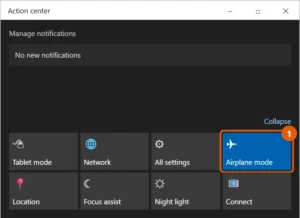
To turn off Airplane mode in Windows 10, select the action center icon on the taskbar and select the Airplane mode tile so it’s no… Continue Reading How to Turn Off Airplane Mode in Windows 10

To get a printer back online in Windows 10, restart the printer and your PC, and make sure both are on the same network. Then… Continue Reading How to Get a Printer Back Online in Windows 10

To register a DLL in Windows 10, open Command Prompt as an administrator, type regsvr32 “C:\path\to\file.dll” using the DLL’s full path, and press Enter. A… Continue Reading How to Register a DLL in Windows 10

Install Windows 10 with a local account: choose the local account option during setup, or switch later in Settings under Accounts, Your info. Continue Reading How to Install Windows 10 Without a Microsoft Account

To fix a black screen in Windows 10, first press Windows logo key + Ctrl + Shift + B to restart the graphics driver. If… Continue Reading How to Fix a Black Screen in Windows 10

To open a port in Windows 10, create an inbound rule in Windows Defender Firewall with Advanced Security. Select Inbound Rules > New Rule, choose… Continue Reading How to Open a Port in Windows 10 Firewall

Eclipse IDE usually doesn’t appear in Apps & features, because its installer just copies it into a folder. To remove it, close Eclipse and delete… Continue Reading How to Uninstall Eclipse IDE on Windows 10
To open a VOB file on Windows 10, install the free VLC media player from videolan.org, then right-click the VOB file and select Open with… Continue Reading How to Open VOB Files on Windows 10

Recently deleted files on Windows 10 go to the Recycle Bin. Double-click Recycle Bin on the desktop, sort by Date Deleted, right-click the file, and… Continue Reading How to Find Recently Deleted Files on Windows 10

Windows 10 usually creates its own recovery partition. Check it with reagentc /info and enable it with reagentc /enable, or create a recovery USB. Advanced diskpart steps included. Continue Reading How to Create a Recovery Partition in Windows 10

To reinstall the Bluetooth driver in Windows 10, open Device Manager, expand Bluetooth, right-click your Bluetooth adapter, and select Uninstall device. Then restart your PC.… Continue Reading How to Reinstall the Bluetooth Driver in Windows 10

Install the OpenSSH Server optional feature in Windows 10, start the sshd service, check the firewall rule on port 22, and connect with ssh username@ip. Continue Reading How to Enable SSH in Windows 10 (Client and Server)

Change your location in Windows 10 from Settings > Privacy > Location > Set default, or change your country or region with one PowerShell command. Continue Reading How to Change Your Location in Windows 10

To clear an app’s data and cache in Windows 10, select Start > Settings > Apps > Apps & features. Select the app, select Advanced… Continue Reading How to Clear App Data and Cache in Windows 10

Swap the Microsoft account and keep your files, add the other account as a new user, or just change the sign-in email. Step-by-step for Windows 10. Continue Reading How to Change the Microsoft Account on Windows 10