How to Create a Virtual Machine in Windows 11
A virtual machine (VM) is a computer that runs inside a window on your PC. It has its own operating system, apps, and files, so… Continue Reading How to Create a Virtual Machine in Windows 11
A virtual machine (VM) is a computer that runs inside a window on your PC. It has its own operating system, apps, and files, so… Continue Reading How to Create a Virtual Machine in Windows 11

Select Start > Settings > Network & internet > Wi-Fi > Manage known networks. Find the network and select Forget. Windows stops connecting to it… Continue Reading How to Forget a Wi-Fi Network in Windows 11

In Microsoft Edge, go to Settings and more (…) > Settings > Privacy, search, and services > Search and connected services > Address bar and… Continue Reading How to Make Google the Default Search Engine in Windows 11

Go to Start > Settings > System > Storage > Cleanup recommendations and open Large or unused files. Or open File Explorer, select This PC,… Continue Reading How to Find Large Files in Windows 11

To add a printer in Windows 11, open Settings, go to Bluetooth & devices, then Printers & scanners, and select Add device next to Add a printer or scanner. Continue Reading How to Add a Printer in Windows 11
When the C drive fills up, Windows 11 slows down, updates fail, and apps refuse to install. If your disk has spare space in another… Continue Reading How to Extend C Drive in Windows 11

Press Windows logo key + R, type winver, and press Enter. The About Windows box shows your version, such as 25H2, and the OS build… Continue Reading How to Check Your Windows Version in Windows 11

Go to Start > Settings > Network & internet > Advanced network settings > Hardware and connection properties. Your MAC address is listed as Physical… Continue Reading How to Find Your MAC Address in Windows 11

Select Start, type cmd, and open Command Prompt. Type ipconfig /flushdns and press Enter. When you see Successfully flushed the DNS Resolver Cache, it’s done.… Continue Reading How to Flush the DNS Cache in Windows 11

Install Windows 11 on a PC that fails the TPM, CPU or Secure Boot check using a Rufus USB or a registry setting for in-place upgrades. What you give up and which PCs can’t run it. Continue Reading How to Install Windows 11 on an Unsupported PC (and the Risks)
A restore point is a snapshot of Windows 11’s system files, installed programs, drivers and registry settings. If an update, driver or app breaks something,… Continue Reading How to Create a Restore Point in Windows 11

Select Start > Settings > Bluetooth & devices > Printers & scanners. Select the printer you want to remove, select Remove, then select Yes. Applies… Continue Reading How to Remove a Printer in Windows 11

Set a static IP in Settings > Network & internet > IP assignment > Edit, or get a new one with ipconfig /release and /renew. Public IPs change on the router or with a VPN. Continue Reading How to Change IP Address in Windows 11

Start with the quick wins: restart your PC, install updates in Settings > Windows Update, turn off apps you don’t need at startup in Task… Continue Reading How to Make Your PC Faster in Windows 11

Windows 11 doesn’t come with an app that plays DVD movies. To watch one, you need a DVD drive (built in or USB) and a… Continue Reading How to Play a DVD on Windows 11
The quickest way to find your Wi-Fi password on Windows 11 is in Settings: go to Network & internet > Wi-Fi, open your network’s properties,… Continue Reading How to Find WiFi Password on Windows 11

Format Windows 11 by resetting the PC with Remove everything, or do a clean install from a USB drive. Plus how to back up first and set the PC up again afterwards. Continue Reading How to Format Windows 11

To change the time zone in Windows 11, go to Settings > Time & language > Date & time. Turn off Set time zone automatically,… Continue Reading How to Change the Time Zone in Windows 11
Windows 11 names your user folder (the one in C:\Users) when you first sign in to an account, and it never renames it on its… Continue Reading How to Rename User Folder in Windows 11

Select Start > Settings > Network & internet > Advanced network settings > Network reset. Select Reset now, then Yes. Your PC restarts, and Windows… Continue Reading How to Reset Network Settings in Windows 11

To back up your files to an external drive in Windows 11, plug in the drive, open Control Panel, and go to System and Security… Continue Reading How to Back Up Windows 11 to an External Hard Drive

To clear the printer queue in Windows 11, go to Settings > Bluetooth & devices > Printers & scanners. Select your printer, then Open print… Continue Reading How to Clear the Printer Queue in Windows 11

To disable Windows Defender in Windows 11, open Windows Security > Virus & threat protection > Manage settings and switch Real-time protection off. Continue Reading How to Disable Windows Defender in Windows 11

To change your password in Windows 11, go to Settings > Accounts > Sign-in options. Select Password, then Change. Confirm who you are, enter your… Continue Reading How to Change Your Password in Windows 11

Sign in with a PIN, turn on automatic sign-in with netplwiz, or remove a local account password. Plus how to stop Windows asking after sleep. Continue Reading How to Turn Off the Password on Windows 11

Select Start > Settings > System > Display > Advanced display. Next to Choose a refresh rate, pick the rate you want, such as 60… Continue Reading How to Change the Refresh Rate in Windows 11

Delete temporary files in Windows 11 from Settings > Storage > Temporary files, clear the %temp% folder, use Disk Cleanup, and turn on Storage Sense to clean up automatically. Continue Reading How to Delete Temporary Files in Windows 11

Press F11 to make your browser or File Explorer fill the whole screen. Press F11 again to go back. To make any other window as… Continue Reading How to Go Full Screen in Windows 11

Press Windows logo key + Ctrl + Enter to turn off Narrator in Windows 11, or use Settings > Accessibility > Narrator. Stop it starting again too. Continue Reading How to Turn Off Narrator in Windows 11

Change the Windows 11 lock screen wallpaper in Settings > Personalization > Lock screen: choose Picture, Slideshow, or Windows spotlight. Continue Reading How to Change the Lock Screen Wallpaper in Windows 11

Windows 11 Pro uses the same download as Home: get it from Microsoft with the Installation Assistant, Media Creation Tool or ISO, and your key picks Pro. Or upgrade Home to Pro in Settings. Continue Reading How to Download Windows 11 Pro

Stop McAfee pop-ups on Windows 11: turn off alerts and offers in the McAfee app, silence it in Windows notifications, block fake McAfee browser notifications, or uninstall it. Continue Reading How to Stop McAfee Pop-Ups on Windows 11

To mount an ISO file in Windows 11, right-click it in File Explorer and select Mount. See how to eject it, use PowerShell, and fix a missing Mount option. Continue Reading How to Mount an ISO File in Windows 11

To change the Windows 11 desktop background, right-click the desktop, select Personalize, then Background, and pick a picture, color, or slideshow. Continue Reading How to Change the Desktop Background in Windows 11

Open File Explorer and select This PC. Each drive shows a bar and a line such as 180 GB free of 476 GB. The second… Continue Reading How to Check Hard Drive Space in Windows 11

Right-click the folder, select Properties, open the Customize tab and select Change Icon. Pick an icon or your own .ico file, then select OK and Apply. Continue Reading How to Change a Folder Icon in Windows 11
If your iPhone 15 is acting up and you need a quick fix, forcing a restart is a handy trick. To do this, quickly press… Continue Reading How to Force Restart iPhone 15
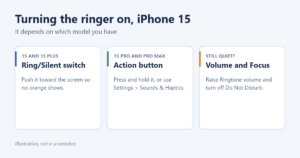
Flip the Ring/Silent switch on iPhone 15 and 15 Plus, or press and hold the Action button on iPhone 15 Pro. Then check volume and Focus if calls still don’t ring. Continue Reading How to Turn the Ringer On on iPhone 15

To turn off Auto-Brightness on an iPhone 15, go to Settings > Accessibility > Display & Text Size and switch off Auto-Brightness. Continue Reading How to Turn Off Auto-Brightness on iPhone 15

To turn off an iPhone 15 screen, press the side button once, or set a short time in Settings > Display & Brightness > Auto-Lock. Continue Reading How to Make an iPhone 15 Screen Turn Off
The camera timer on your iPhone 15 gives you a few seconds to get into the shot, which is perfect for group photos, full-body pictures… Continue Reading How to Set Timer on iPhone 15 Camera
The Dynamic Island is the pill-shaped cutout at the top of every iPhone 15, 15 Plus, 15 Pro and 15 Pro Max screen. Instead of… Continue Reading How to Use Dynamic Island on iPhone 15
To take a screenshot on iPhone 15, quickly press and release the side button and the volume up button at the same time. The screen… Continue Reading How to Take Screenshot on iPhone 15
Putting your iPhone 15 on vibrate means turning on Silent mode while keeping haptics (vibrations) switched on. Your phone stops ringing but still buzzes for… Continue Reading How to Put iPhone 15 on Vibrate

Fix SOS on an iPhone 15: toggle Airplane Mode, restart, turn on your line, update carrier settings and iOS, then contact your carrier. Continue Reading How to Get an iPhone 15 Out of SOS Mode
To turn off an iPhone 15 Pro Max, press and hold the side button and either volume button until the sliders appear, then drag slide… Continue Reading How to Turn Off iPhone 15 Pro Max

Swipe up from the bottom and pause to open the App Switcher, then swipe the app up to close it. Plus closing several apps, background settings and frozen apps. Continue Reading How to Close Apps on iPhone 15
To put an iPhone 15 or iPhone 15 Plus on silent, push the Ring/Silent switch on the upper-left side toward the back of the phone,… Continue Reading How to Put iPhone 15 on Silent
To use Apple Pay on an iPhone 15, first add a card in the Wallet app by tapping the + button. To pay in a… Continue Reading How to Use Apple Pay on iPhone 15

To stop apps from running in the background on Windows 10, select Start > Settings > Privacy > Background apps. Turn off Let apps run… Continue Reading How to Close Apps Running in the Background on Windows 10